Home › Features › Shared team inbox
One WhatsApp number. Your whole team.
Stop passing a phone around. The shared team inbox puts every WhatsApp conversation in one real-time workspace where agents can claim, reply, hand over and resolve chats together.
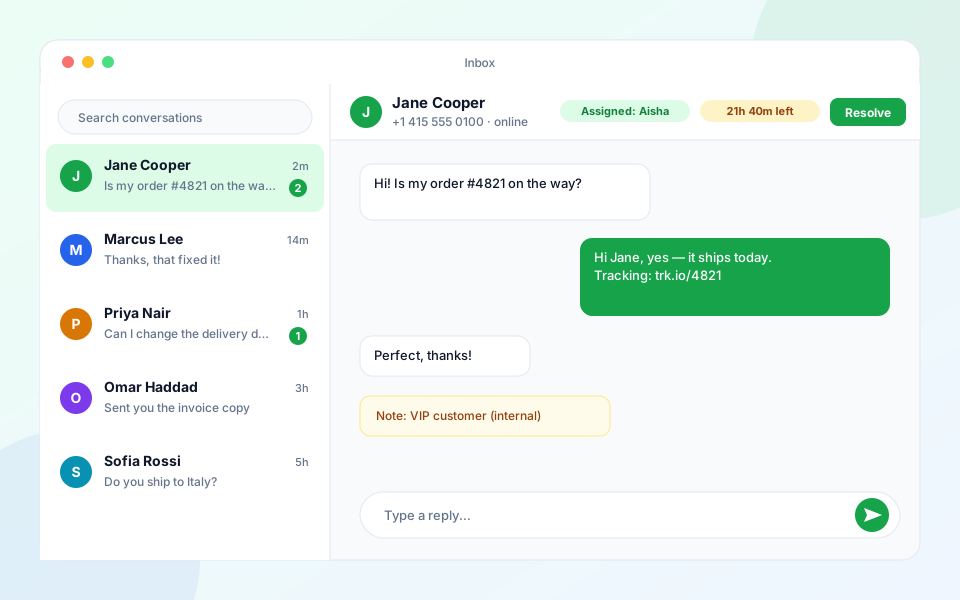
What you get
Real-time conversations
New messages appear instantly with unread counters, so agents always see what needs attention first. Text, images, video, audio and documents are all supported.
Agent assignment & hand-over
Assign a chat to a teammate, reassign it when the topic changes, and resolve or reopen conversations to keep the queue clean.
24-hour window indicator
WhatsApp only allows free-form replies for 24 hours after the customer writes. The inbox shows the countdown and switches to approved templates when the window closes.
Roles & permissions
Owners, admins and agents see only what they should. Custom roles control who can view the inbox, export contacts or manage billing.
Contact context
Tags, custom fields and conversation history sit beside the chat so agents never have to ask a customer the same question twice.
Works on mobile
An installable phone app (PWA) lets agents reply from anywhere with push notifications for new messages.
Frequently asked questions
Can several agents use the same WhatsApp Business number?
Yes. The inbox connects your number through the official WhatsApp Cloud API, so any number of team members can work on it at once, within the seat limit of your plan.
Can I still use the WhatsApp Business app on my phone?
A number registered on the Cloud API is managed from the panel. Agents use the web inbox or the installable mobile app instead of the phone's WhatsApp Business app.
What happens after 24 hours?
Free-form replies are blocked by WhatsApp after 24 hours without a customer message. The panel then lets agents send an approved template to restart the conversation.