Home › Features › Template manager
Templates approved faster, managed in one place.
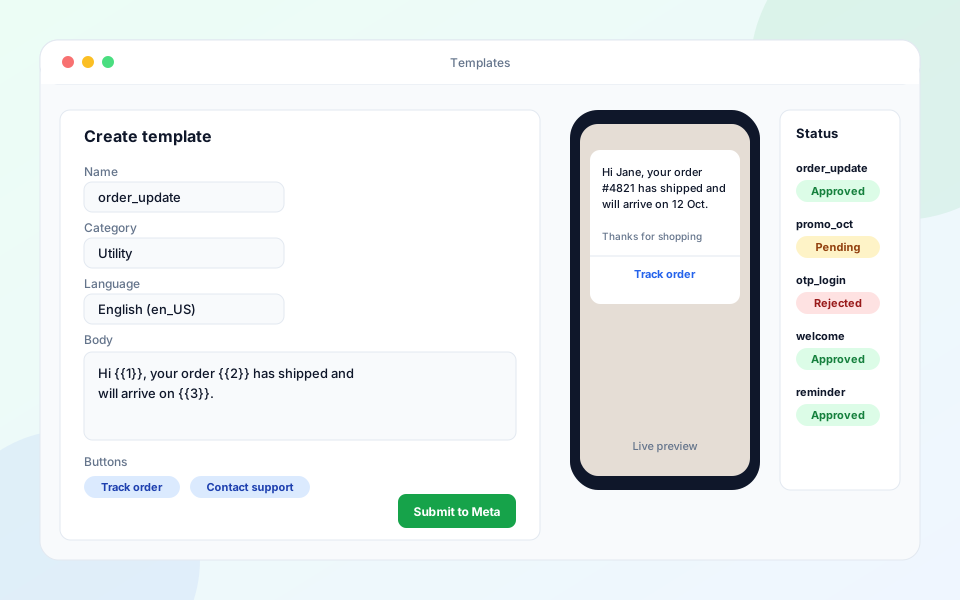
Design header, body, footer and button content with a live preview, submit it to Meta from the panel and see the approval result without leaving the page.
What you get
Live preview
See exactly how the template will look on a phone as you type, variables included.
Submit to Meta in one click
No need to switch to Meta Business Manager. Templates are submitted straight from the panel.
Automatic status sync
Approval, rejection and quality changes arrive by webhook, so the list is always current.
Categories & languages
Choose utility, marketing or authentication and create the same template in several languages.
Reuse everywhere
Approved templates are available instantly to campaigns, flows and the API.
Rejection reasons
When Meta rejects a template the reason is shown so you can fix and resubmit quickly.
Frequently asked questions
How long does template approval take?
Approval is decided by Meta and is often quick, but timing is not guaranteed. The panel shows the live status.
Can I edit an approved template?
Meta limits edits to approved templates. You can create a new version and submit it for approval.
Do I need templates at all?
You need one to start a conversation or to message a customer after the 24-hour window has closed.